

Accessibility
Accessible Learning with Seesaw
Accessibility Philosophy
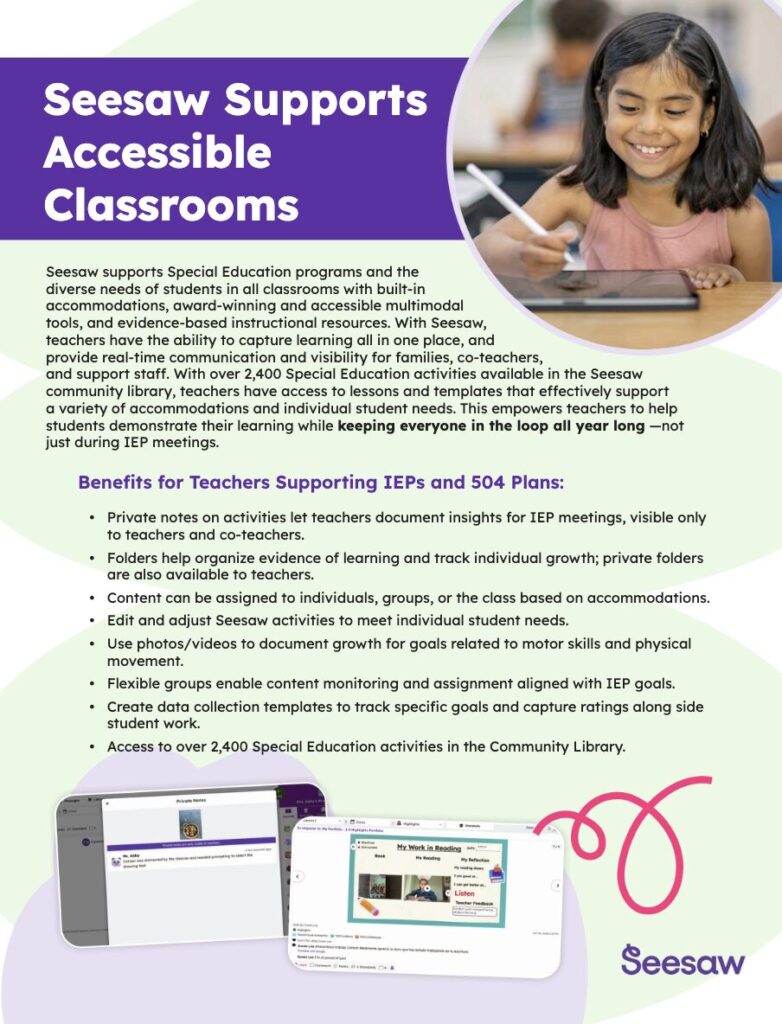
Seesaw is passionate about providing learners with diverse ways to demonstrate and share their learning. Our intuitive tools allow students to use photos, videos, voice, text, and more to showcase their understanding. For example, they can photograph written work, record videos of reading aloud, type or draw responses, or use our Draw+Record tool to narrate their thought process during math problems.
Teachers can also offer multiple modes of instruction. They can add voice or video instructions to lessons or announcements to support pre-readers and visually impaired students. Text labels, captions, and closed captions can be used for hearing-impaired students and families. Teachers can differentiate instruction by assigning tailored lessons or activities to different students.
For students or family members using assistive technologies, please add captions or voice captions to all multimedia posts.
To foster a strong learning community, teachers, students, and family members can leave voice and text comments on student work. Seesaw also offers translation features for teachers and families who speak different languages.
These features enhance understanding, allow personalized expression of learning, and build a supportive learning loop among students, educators, and families.
We are committed to improving the accessibility of Seesaw for diverse learners and families. Seesaw complies with WCAG 2.1 AA standards. For limitations and alternatives, please refer to our Accessibility Statement.
For additional information regarding Seesaw’s accessibility, please contact accessibility@seesaw.me.
Technical Accessibility Details
From a technical perspective, Seesaw is compliant with WCAG 2.1 AA. For limitations and alternatives, please see further details in our Accessibility Statement.
Screen Readers are supported on the web version of Seesaw. VoiceOver is supported on iOS and TalkBack is supported on Android.
Seesaw provides basic alt text for user-generated content (ex: “Javier’s post, in response to Writers Workshop, 2 pages”), but custom alt text can be provided in several ways. Learn more.
Closed captions can be uploaded to videos in multiple languages. Learn more
Custom voice instructions and voice labels can be added to all user-generated content. Learn more
Basic accessibility features built into the operating system or browser for adjusting color contrast, inverting colors, zoom, increasing font size are supported on the web. On iOS, text is sized for WCAG 2.1 compliance, but modifying the text size of the app user interface is not yet supported.
Teachers, students, and families can print any post or assignment by tapping the […] more options menu and selecting Print.
For a more detailed report on the accessibility of Seesaw, you can also review our Government Product Accessibility Template (GPAT) and our Accessibility Compliance Report (ACR).
These documents explain how information and communication technology products such as software, hardware, electronic content, and support documentation meet the Revised 508 Standards for IT accessibility. Learn more.
Supplemental Accessibility Tools
- Chrome Browser and Chrome OS: Turn on Live Caption to get captions for any videos or voice recordings that were recorded in English. Follow these steps.
- Chrome Browser: Translation for students can be enabled with this Translation Plugin.
- Edge Browser: Seesaw supports the Read Aloud tool that is available in Edge. Install the latest version of Edge, then right-click on the screen, and choose “Read Aloud” to enable this functionality to read text in posts or assignments aloud. More details.
How Seesaw Supports Accessibility in the Classroom
Seesaw Supports Equity & Access & Diverse Learners
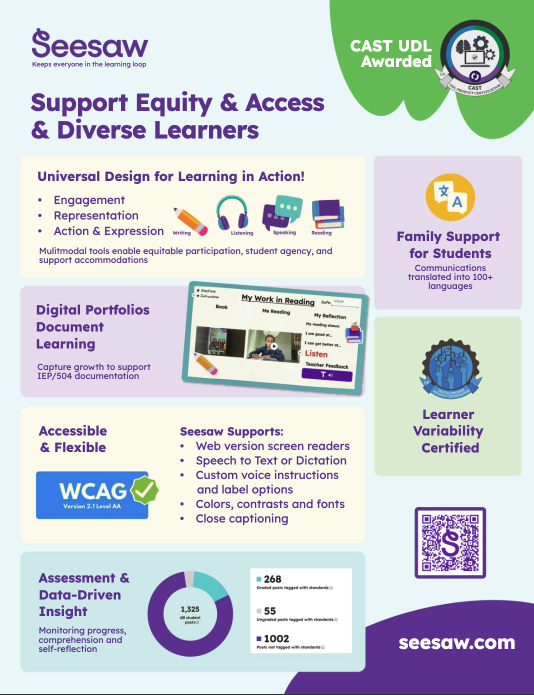
Seesaw provides support, equity and, access for all learners and is proud to be recognized for:
- WCAG Compliance
- Digital Promise Certifications
- Cast UDL Awarded
- Inclusivity of all families in the learning journey through translation and digital portfolios
“With Seesaw's record feature, kids can record themselves reading and parents can play it back. This has been a powerful tool for my non-verbal students and those with limited communication skills who become verbal by the end of the year: During end-of-year parent-teacher conferences, I get to sit with families and play for them a recording of a child at the beginning of the year communicating through their device or having an aide read to them, compare it to the middle of the year, when they start vocalizing sounds and words, and to the end of the year, when they are reading independently.”
Accessibility Statement for Seesaw
Measures to support accessibility
Seesaw Learning Inc. is committed to supporting the accessibility of our products and services and takes the following measures to ensure the accessibility of Seesaw:
- Include accessibility as part of our mission statement.
- Include accessibility throughout our internal policies, products, and curriculum.
- Provide continual accessibility training for our staff.
- Employ formal accessibility quality assurance methods.
- Include people with disabilities and learning differences in our design personas, user research, and product/curriculum validation process.
Conformance status
The Web Content Accessibility Guidelines (WCAG) defines requirements for designers and developers to improve accessibility for people with disabilities. It defines three levels of conformance: Level A, Level AA, and Level AAA. Seesaw is partially conformant with WCAG 2.1 level AA. Partially conformant means that some parts of the content do not fully conform to the accessibility standard. Exceptions to conformance are detailed below.
Compatibility with browsers and assistive technology
Technical specifications
Accessibility of Seesaw relies on the following technologies to work with the particular combination of web browser and any assistive technologies or plugins installed on your computer:
- HTML
- WAI-ARIA
- CSS
- JavaScript
Limitations and Alternatives
Despite our best efforts to ensure accessibility of Seesaw, there may be some limitations which are described below, along with some possible alternative solutions and workarounds. If you observe an issue not listed below or have an alternative solution that is not mentioned, please let us know by emailing accessibility@seesaw.me so we can address it.
Known limitations for Seesaw:
User-generated photos, videos and voice recordings. While Seesaw is designed with accessibility in mind, we cannot guarantee that all user-generated content will make use of these features: images uploaded by users might not have text alternatives; videos might not have closed captions; audio recordings might not have text alternatives. This could be, for example, because a young student who is not yet able to read or write is generating content but is unable to provide alternative text for photos, closed captions for videos, or text alternatives for voice recordings. To help mitigate these situations, the following alternatives have been made available.
- To ensure that all content is provided with some label, generic alt text (ex: Gabbie’s post, contains one video) is provided by Seesaw for all photos, videos, and voice recordings.
- We offer options for adult users to add additional accessibility supports, like alt text, text captions and closed captions to assist in making all content as accessible as possible.
- The platform also supports adding multiple media types, so that users can upload content that is most accessible to their specific audience.
- Please review how to add accessibility support or use our multimedia tools: https://help.seesaw.me/hc/en-us/articles/360047206692-Accessibility-and-Seesaw.
Accessibility Conformance Report
You can learn more about how Seesaw conforms to accessibility standards by reviewing our Accessibility Conformance Report (ACR).
Contact Us for Feedback and Formal Complaints
Please contact us directly at accessibility@seesaw.me to report an issue or suggest an improvement. Our team will respond within 5 business days to review your message and respond.
Formal approval of this accessibility statement
This Accessibility Statement is approved by:
Seesaw Learning Inc
Product and Curriculum Department
Lead Product Manager or Director of Curriculum
This statement was created on 23 January 2024 using the W3C Accessibility Statement Generator Tool and revised on 24 May 2024 with a third-party accessibility consultant.
Assessment Approach
Seesaw Learning Inc assessed the accessibility of Seesaw by the following approaches:
- Self-evaluation
- External evaluation
Test Process
We performed a manual, tool-assisted technical evaluation of the test sample. As part of the test process, we:
- Evaluated each element against all relevant success criteria of WCAG 2.1 A/AA
- Conducted manual testing, using tools such as the ARC Toolkit, Colour Contrast Analyser, and inspection tools like aViewer and Inspect.exe
- Where appropriate/necessary, performed compatibility testing, using common assistive technologies such as JAWS, NVDA, VoiceOver, TalkBack and ZoomText
Testing was conducted on the following platform(s):
- Desktop: Windows / MacOS
- Browser: Chrome/JAWS, Firefox/NVDA, Safari/VoiceOver
Testing was carried out on all elements within the test sample. For each element, conformance with all relevant success criteria was identified, and any issues were reported.